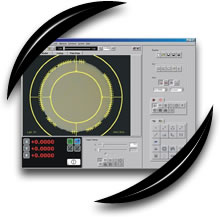
 Gage-X
is designed for systems with manual stages. Gage-X
is a full featured measurement software with intuitive
point and click interfaces. It has icon toolboxes
that make it simple to do a measurement or write
a part program. And with Gage-X on a RAM video System,
your operators will find it easy to use. You will
save time and money from measurement software that
is easy to learn and a pleasure to use. Gage-X
is designed for systems with manual stages. Gage-X
is a full featured measurement software with intuitive
point and click interfaces. It has icon toolboxes
that make it simple to do a measurement or write
a part program. And with Gage-X on a RAM video System,
your operators will find it easy to use. You will
save time and money from measurement software that
is easy to learn and a pleasure to use.
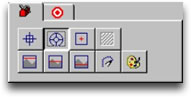
Gage-X is easy to use because of convenient features
like these icon tools. Simply click on the tool
you need -- no need to read through lengthy or cryptic
pull-down menus. Put the cursor over the tool for
a popup description of it. In no time you'll know
which tool does what and be off and running!
CompuFocus™
It's easy to focus with Compufocus™. Simply
watch the arrows as you move the focus adjustment.
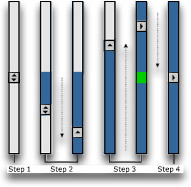
1. Click the mouse after drawing a cursor around
the feature you want in focus and a double headed
arrow appears to the right of the window.
2. Move the Z-Stage up or down until the double-headed
arrow changes to a single arrow.
3. Then move the Z-Stage in the direction of the
arrow until the arrow points to the right, and a
green square appears.
4. Move the Z Stage again until the box with the
arrow is over the flashing green box. You are now
in perfect focus.
|




